Web Automation With n8n, Telegram, Online Forms, and a Bit of Python
I have a small side project where I sell subscriptions for two TradingView scripts. It brings me around $200 each month, and I described its stncelled subscriptions, which takes 1-2 hours per month at maximum. But automating everything required patching together some Python web crawlers, Telegram API, and email clients as well as setting up n8n to orchestrate everything.
Here are the common tasks that I had to automate:
- The most critical part was automating the process of giving customers access to the scripts when they buy subscriptions through Gumroad. The world doesn't stop when I go to sleep, and sometimes people buy a subscription in the middle of my night. Most customers are patient and will wait for a few hours (as it's explained in the product's description). But every now and then, I have that one type of customer who will start spamming me with emails like "I still don't have access" after five minutes. I didn't want to drop whatever I was doing and rush to my computer to give someone access whenever I got an email about a new sale, so I had to automate this process. Gumroad offers a developer-friendly feature called "Ping", which sends a JSON request to a specific URL each time you make a sale. Unfortunately, TradingView has no official API to manage user access, and when I started this project in 2021, there weren't even any unofficial ones like this one. So, I needed a way to automate granting access to the users and sending them an email with confirmation and some useful instructions on how to use the script when they subscribed.
- There were even more access-related actions I wanted to simplify. When someone cancelled their subscription, I had to revoke their access from the day their subscription would expire (which could be immediate if the subscription was cancelled because of a failed payment or up to a year from now if they had a yearly subscription). When people asked for a free trial, I had to give them access for a week. All that would require me to log in to TradingView, navigate to the corresponding script and click through some selection fields to grant access to a given user. I could write a CLI script, but that would require me to use my computer, and sometimes, all I had with me was my phone. So, I've decided to write a Telegram bot that I could use to give or remove access since I had Telegram installed both on my phone and on my computer.
- For a long time, I was offering a free one-week trial for anyone leaving a comment under one of the paid scripts, meaning I had to check who left a comment and grant them access. This could also be automated - I could ask people to fill in an online form that would send a request to my CLI and automatically grant them seven-day access.
High-level overview
Here's a diagram of my setup:
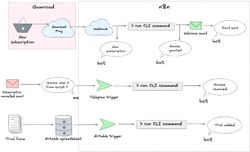
Let's break it down by explaining how I got from doing all the work manually to a semi-automated setup where new customers and people requesting a trial get access automatically, and any other permissions management can be done with a Telegram bot.
Python script
The first step was to automate the interactions with TradingView. There is no official API, so I needed a tool like Puppeteer, which can control a headless browser to automate clicking, typing, and any other website interaction needed to grant or revoke access to my TradingView scripts. I chose the pyppeteer package - an unofficial Python port of Puppeteer.
Below is the code I wrote to interact with the TradingView website and perform a couple of basic interactions:
- Checking if a given TradingView user has access to a specific script.
- Revoking existing access.
- Adding access for a new user. This access could have one of the following expiration dates:
- No expiration date - if the function was called without any additional parameter.
- Expire in seven days - if a parameter "t" (that stands for "trial") was given.
- Expire on a specific day - in case a numeric value was provided as the last parameter. For example, if I passed the value "20240615", the access would expire on 2024.06.15.